Set Appliance State:
Isolate Mains Power to appliance as per TOPs P4
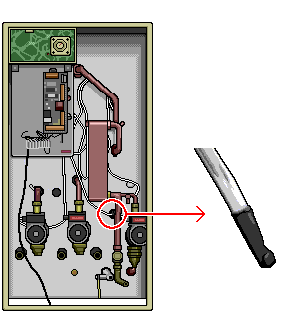
Remove the sensor from its housing
Remove the sensor from its housing
| WARNING! Mains voltage is expected during test, follow TOPs P4 live testing procedure |
Observation:
Please remember to use your voltstick to gently press the SW1 and SW2 buttons.
Set PCB to check the store sensor temperature by pressing SW2 once.
Check the store temperature reading on the PCB reduces towards room temperature.
If store is already at room temperature:
Make a note of current sensor temperature reading.
Warm or cool the sensor (do not immerse in water as sensor is dry pocket)
Mains Power On
Set PCB to check the store sensor temperature by pressing SW2 once.
Check the store temperature reading on the PCB has increased or decreased and adjusts back to room temperature.
Set PCB to check the store sensor temperature by pressing SW2 once.
Check the store temperature reading on the PCB reduces towards room temperature.
If store is already at room temperature:
Make a note of current sensor temperature reading.
| Isolate Mains Power to appliance as per TOP's P4 |
Warm or cool the sensor (do not immerse in water as sensor is dry pocket)
Mains Power On
Set PCB to check the store sensor temperature by pressing SW2 once.
Check the store temperature reading on the PCB has increased or decreased and adjusts back to room temperature.
Isolate as per TOPs P4
and refit as necessary