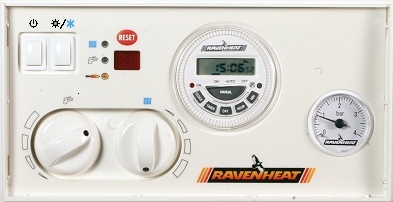
Set Appliance State:
Mains Power Off
DHW Demand
DHW Selector in Maximum (+) position
CH Selector in Minimum (-) position
ON/OFF Switch in ON position
DHW Selector in Maximum (+) position
CH Selector in Minimum (-) position
ON/OFF Switch in ON position
| WARNING! Mains voltage is expected during test, follow TOPs P4 live testing procedure |
Observation:
Is the appliance in lockout?
The appliance may have locked out after the fan has run.
If the appliance appears to be in lockout, take note of the code shown press the reset button on the front panel.
Does the lockout reset and the appliance resume the ignition sequence e.g. fan starts to run?
Note:
Switching the mains power off and back on will not reset a lockout on this boiler.
BOILER RESETS OR NO CODE IS SHOWN
FAULT CODE WILL NOT RESET - GO TO FAULT CODE LIST
The appliance may have locked out after the fan has run.
If the appliance appears to be in lockout, take note of the code shown press the reset button on the front panel.
Does the lockout reset and the appliance resume the ignition sequence e.g. fan starts to run?
Note:
Switching the mains power off and back on will not reset a lockout on this boiler.
BOILER RESETS OR NO CODE IS SHOWN
FAULT CODE WILL NOT RESET - GO TO FAULT CODE LIST