Set Appliance State:
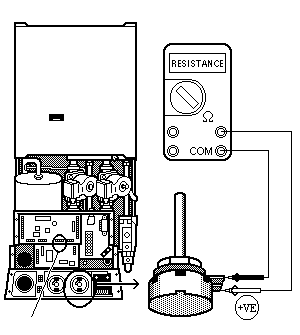
Set Multimeter to Resistance 
Isolate Mains Power to appliance as per TOPs P4
Disconnect the Main PCB Connector marked PL5 from the PCB
Disconnect the Main PCB Connector marked PL5 from the PCB
Measurement:
Measure the resistance between the two Grey wires on the CH Potentiometer.
With the Potentiometer turned down to position 1 a reading of approximately 5 K ohms should be obtained.
As the Potentiometer setting is increased the resistance should reduce.
A reading of approximately 1 ohm should be obtained once the Potentiometer is increased to its maximum setting of 8.
Replace connector after test.
With the Potentiometer turned down to position 1 a reading of approximately 5 K ohms should be obtained.
As the Potentiometer setting is increased the resistance should reduce.
A reading of approximately 1 ohm should be obtained once the Potentiometer is increased to its maximum setting of 8.
Replace connector after test.
Isolate as per TOPs P4
and refit as necessary