Set Appliance State:
| Isolate Mains Power to appliance as per TOPs P4 |
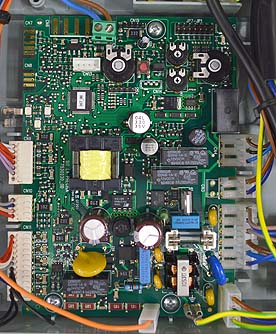
Gain access to PCB (use Insulation Mat as required)
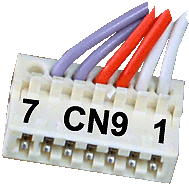
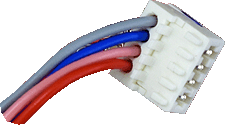
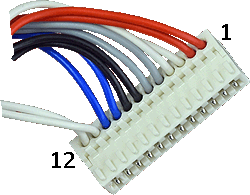
Disconnect low voltage connectors at bottom left of PCB
marked CN9, CN10, and CN11 from the PCB and make safe
Disconnect low voltage connectors at bottom left of PCB
marked CN9, CN10, and CN11 from the PCB and make safe
| WARNING! - Mains voltage is expected during test follow TOPs P4 live testing procedure |
Observation:
Does the LEDs now illuminate? (Fan may still run).
If the leds illuminate:
Reconnect one of the connectors.
Turn mains power back on.
Repeat (isolating each time) to determine which connector stops the LEDs working.
If the leds illuminate:
| Isolate Mains Power to appliance as per TOPs P4 |
Turn mains power back on.
Repeat (isolating each time) to determine which connector stops the LEDs working.