Set Appliance State:
| Isolate Mains Power to appliance as per TOPs P4 |
G.C. Number 47 311 11
Front panel removal
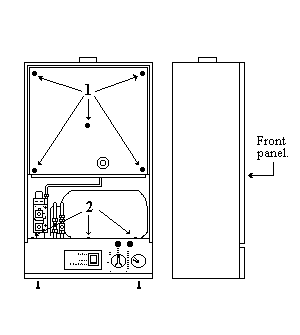
Remove cabinet Front Panel by pulling forward at the bottom and lift of the top supports.
Inner casing cover
Remove the five screws (1) securing the cover to the casing and lift off.
Facia panel
Remove the three screws (2) which hold the facia assembly in position. The assembly can be unhooked from its supports.
Note:
Do not allow the facia to hang unsupported.
Front panel removal
Remove cabinet Front Panel by pulling forward at the bottom and lift of the top supports.
Inner casing cover
Remove the five screws (1) securing the cover to the casing and lift off.
Facia panel
Remove the three screws (2) which hold the facia assembly in position. The assembly can be unhooked from its supports.
Note:
Do not allow the facia to hang unsupported.
Isolate as per TOPs P4
and refit as necessary