Set Appliance State:
| WARNING! - Mains voltage is expected during test follow TOPs P4 live testing procedure |
Observation:
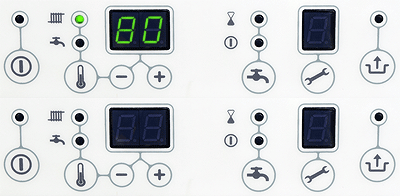
To adjust temperatures press the🌡 button for 2 seconds.
Display will flash the current CH temperature.
Use the + or - buttons to adjust as required.
Tap the 🌡 button again to change to DHW demand.
Use the + or - buttons to adjust as required.
To exit and save settings press the button.
Display will show "P" briefly to confirm changes.
To exit without saving press the button.
Display will flash the current CH temperature.
Use the + or - buttons to adjust as required.
Tap the 🌡 button again to change to DHW demand.
Use the + or - buttons to adjust as required.
To exit and save settings press the button.
Display will show "P" briefly to confirm changes.
To exit without saving press the button.