Set Appliance State:
| WARNING! - Mains voltage is expected during test follow TOPs P4 live testing procedure |
Observation:
Enter the appliance parameter setting mode, click here for a guide on how to do this.
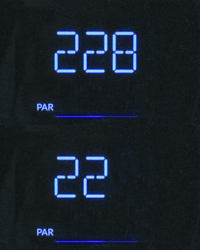
Check parameter 2-2-8, this is the appliance version setting, this can be set incorrectly after fitting a brand new PCB causing a 201 or 203 error code.
On this appliance the parameter 2-2-8 should be set to 0, if it is set to a different value it should be changed to 0.
Once the parameter has been set correctly exit the parameter setting mode.
Error code 201 / 203 should have cleared.
Check parameter 2-2-8, this is the appliance version setting, this can be set incorrectly after fitting a brand new PCB causing a 201 or 203 error code.
On this appliance the parameter 2-2-8 should be set to 0, if it is set to a different value it should be changed to 0.
Once the parameter has been set correctly exit the parameter setting mode.
Error code 201 / 203 should have cleared.