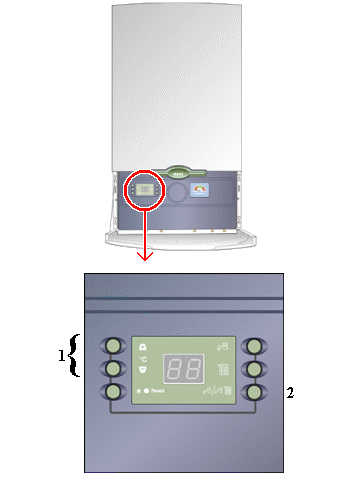
Set Appliance State:
| WARNING! - Mains voltage is expected during test follow TOPs P4 live testing procedure |
Observation:
1. Depress the + and - temperature control buttons at the same time for 5 seconds . The display should show '18' or '20'.
2. Depress the Summer/Winter mode button and the display will show '20' or '21'. The '2' indicates that the installer parameter has been selected, the second digit indicate whether the preheat is off '0' or on '1'. Note whether the preheat is on or off as the appliance will have to be reset to customer requirements after diagnosis.
3. The model requires the preheat to be off so if the figure shown is '20' then leave display as is. If display shows '21' then press the temperature - button once then the display will change to '20' signifying the preheat is switched off.
4. The display will revert to its normal display after 1 minute.
2. Depress the Summer/Winter mode button and the display will show '20' or '21'. The '2' indicates that the installer parameter has been selected, the second digit indicate whether the preheat is off '0' or on '1'. Note whether the preheat is on or off as the appliance will have to be reset to customer requirements after diagnosis.
3. The model requires the preheat to be off so if the figure shown is '20' then leave display as is. If display shows '21' then press the temperature - button once then the display will change to '20' signifying the preheat is switched off.
4. The display will revert to its normal display after 1 minute.