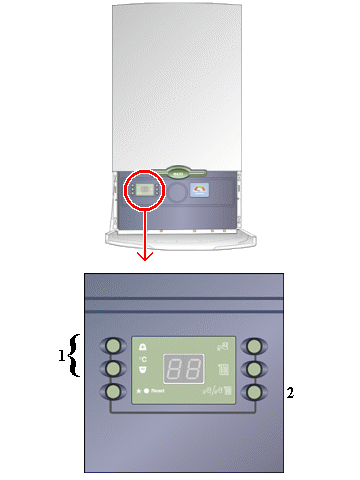
Set Appliance State:
Mains Power Off
| WARNING! - Mains voltage is expected during test follow TOPs P4 live testing procedure |
Observation:
Set appliance to run in preheat mode
1. Depress the + and - temperature control buttons at the same time for 5 seconds.
The display should show '18' or '20'.
2. Depress the Summer/Winter mode button and the display will show '20' or '21'.
If '20' is shown then the preheat mode is switched off.
To switch on the preheat mode press the + button and the display will change to '21'
signifying that preheat mode is now operational.
3. The display will revert to its normal display after 1 minute.
4. To turn off preheat repeat as above but depress the - button to change selection from '21' to '20'.
Ensure there is preheat demand i.e. appliance is cool.
With preheat set the appliance should fire at low rate and heat secondary heat exchanger to required
setting then shut down. Operation should take approximately 1 minute from cold.
1. Depress the + and - temperature control buttons at the same time for 5 seconds.
The display should show '18' or '20'.
2. Depress the Summer/Winter mode button and the display will show '20' or '21'.
If '20' is shown then the preheat mode is switched off.
To switch on the preheat mode press the + button and the display will change to '21'
signifying that preheat mode is now operational.
3. The display will revert to its normal display after 1 minute.
4. To turn off preheat repeat as above but depress the - button to change selection from '21' to '20'.
Ensure there is preheat demand i.e. appliance is cool.
With preheat set the appliance should fire at low rate and heat secondary heat exchanger to required
setting then shut down. Operation should take approximately 1 minute from cold.