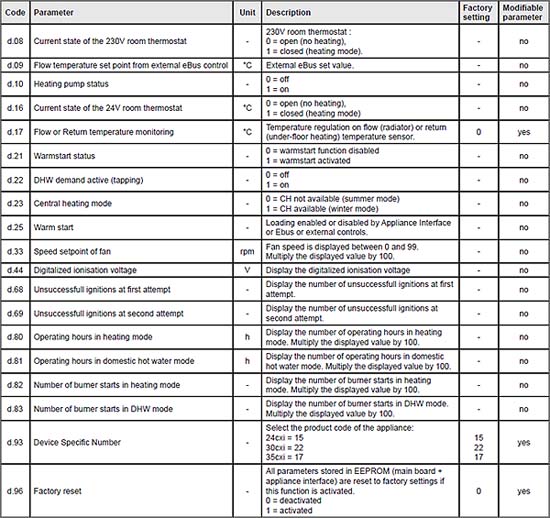
Factory Reset Procedure
Press for more than 7 seconds on the MODE button to access the configuration menu. The screen displays "0".
Press on button + or - under the symbol and navigate to number 35.
Press on MODE to validate. The screen displays the parameter "d.00" and its value "XX.
Press on button + or - under the symbol to access the parameter 96.
Press on button + or - under the symbol to modify the value of the parameter to 1 = activated, allow parameter to stop flashing.
Press for more than 3 seconds on the button MODE to exit the configuration menu.
If after factory reset the fault code changes from the original to a different fault code,
then CLICK HERE.
Press for more than 7 seconds on the MODE button to access the configuration menu. The screen displays "0".
Press on button + or - under the symbol and navigate to number 35.
Press on MODE to validate. The screen displays the parameter "d.00" and its value "XX.
Press on button + or - under the symbol to access the parameter 96.
Press on button + or - under the symbol to modify the value of the parameter to 1 = activated, allow parameter to stop flashing.
Press for more than 3 seconds on the button MODE to exit the configuration menu.
If after factory reset the fault code changes from the original to a different fault code,
then CLICK HERE.