Set Appliance State:
| WARNING! - Mains voltage is expected during test follow TOPs P4 live testing procedure |
Observation:
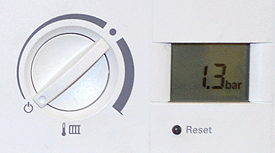
Rotate the CH temperature control knob to the OFF position
(This will allow you to see the current system pressure)
Increase the system pressure slowly while observing the display, increase the pressure to approximately 1.0 - 1.5 bar.
(This will allow you to see the current system pressure)
Increase the system pressure slowly while observing the display, increase the pressure to approximately 1.0 - 1.5 bar.