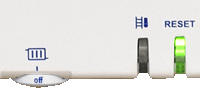
If a new Parameter Unit has been fitted the heat output of the appliance must be set - the appliance will not run until this has been done, the left hand LED flashes to indicate the heat output must be set and to indicate what the output is. Unless the system requirements have changed the appliance should be set to the original heat output (as marked on the sticker on the underside of the appliance casing).
Please note once the setting is confirmed it cannot be changed and if the output needs to be altered then another Parameter Unit is required.
Mains Power On
Step 1:
By short pressing the left hand button it is possible to toggle through the various output settings (the number of flashes corresponds to an output as listed in the table, if you miss the desired output it is possible to navigate back to it as the outputs cycle on a loop).
Step 2:
Select the desired output by choosing the correct number of flashes by short pressing the reset button once. The left hand LED will start flashing orange.
Step:3
If the output is not correct at this stage short press either of the buttons to return to step 1. If the output is correct then long press the reset button to store the output.
Step 4:
If necessary attach the appropriate sticker from the PU kit and mark the output correctly.
Please note once the setting is confirmed it cannot be changed and if the output needs to be altered then another Parameter Unit is required.
| WARNING! - Mains voltage is expected during test follow TOPs P4 live testing procedure |
Step 1:
By short pressing the left hand button it is possible to toggle through the various output settings (the number of flashes corresponds to an output as listed in the table, if you miss the desired output it is possible to navigate back to it as the outputs cycle on a loop).
Step 2:
Select the desired output by choosing the correct number of flashes by short pressing the reset button once. The left hand LED will start flashing orange.
Step:3
If the output is not correct at this stage short press either of the buttons to return to step 1. If the output is correct then long press the reset button to store the output.
Step 4:
If necessary attach the appropriate sticker from the PU kit and mark the output correctly.