Set Appliance State:
| WARNING! - Mains voltage is expected during test follow TOPs P4 live testing procedure |
Observation:
This appliance stores the last 8 faults that it has detected.
To view them press the M and - buttons together for approx. 5 seconds (until display changes).
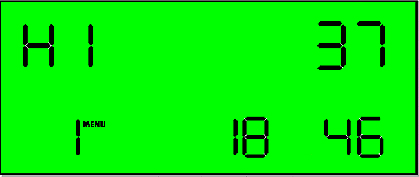
Boiler now shows most recent fault code (1 in bottom left). Press the + and - buttons to see other previous codes.
To exit fault code history press the M and - buttons together
again for approx. 5 seconds until display changes back to normal.
Information:
Using fault code history can help diagnose intermittent faults.
You may also wish to question the customer:
Does the fault code appear at a certain time during the day?
How long does the boiler operate until the fault code appears?
Does it appear during a DHW or CH demand?
Is the same fault code appearing on a regular basis?
The above are only example questions, any information the
customer can provide can help find the cause of the fault.
Although XSol will diagnose a faulty component, if no fault code is present during testing then use engineer judgement to decide whether this component requires replacement or servicing.
To view them press the M and - buttons together for approx. 5 seconds (until display changes).
Boiler now shows most recent fault code (1 in bottom left). Press the + and - buttons to see other previous codes.
To exit fault code history press the M and - buttons together
again for approx. 5 seconds until display changes back to normal.
Information:
Using fault code history can help diagnose intermittent faults.
You may also wish to question the customer:
The above are only example questions, any information the
customer can provide can help find the cause of the fault.
Although XSol will diagnose a faulty component, if no fault code is present during testing then use engineer judgement to decide whether this component requires replacement or servicing.