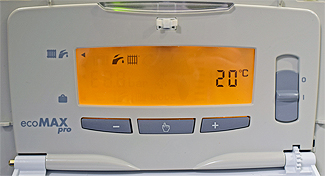
Set Appliance State:
| WARNING! - Mains voltage is expected during test follow TOPs P4 live testing procedure |
Measurement:
Before continuing diagnosis check:
1. That the flow temperature is set to maximum - press the 'mode' button (👆)
then press the + button until temperature on the right hand side stops increasing.
Default max temp is 80°C but can be adjusted to 73°C or 50°C in display parameters.
2. The boiler is turned on (not set to 'holiday' mode) - press the 'mode' button again,
there should be a ◄ symbol next to the radiator / tap symbols at the top left.
If it is next to the suitcase symbol then press the + button once to adjust.
Press the mode button again to return to the default display.
3. If the display PCB has been recently replaced then it is recommended to check all the internal parameters have been set up correctly as this can affect ignition, output or cause various fault codes to display.
Click HERE for information on configuring the display PCB.
1. That the flow temperature is set to maximum - press the 'mode' button (👆)
then press the + button until temperature on the right hand side stops increasing.
Default max temp is 80°C but can be adjusted to 73°C or 50°C in display parameters.
2. The boiler is turned on (not set to 'holiday' mode) - press the 'mode' button again,
there should be a ◄ symbol next to the radiator / tap symbols at the top left.
If it is next to the suitcase symbol then press the + button once to adjust.
Press the mode button again to return to the default display.
3. If the display PCB has been recently replaced then it is recommended to check all the internal parameters have been set up correctly as this can affect ignition, output or cause various fault codes to display.
Click HERE for information on configuring the display PCB.