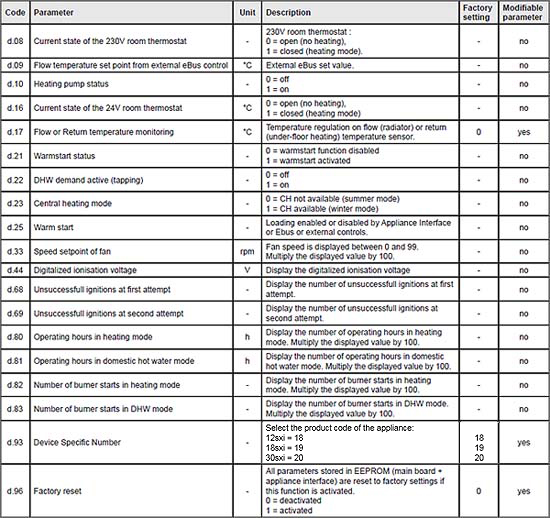
Sometimes the software can show a fault despite the DS Number being correct. This is usually after the PCB has been replaced.
Following the procedure below change the DS Number to an incorrect value then repeat the procedure to put the DS Number back to the correct value to see if this clears the fault code.
Parameter DSN Number Procedure
Press for more than 7 seconds on the MODE button to access the configuration menu. The screen displays "0".
Press on button + or - under the symbol and navigate to number 35.
Press on MODE to validate. The screen displays the parameter "d.00" and its value "XX.
Press on button + or - under the symbol to access the parameter d.93.
If required press on button + or - under the symbol to modify the value of the parameter to 12 SXI = 18, 18 SXI = 19, 30 SXI = 20. (Remember to set to an incorrect number first time you adjust this parameter)
Press for more than 3 seconds on the button MODE to exit the configuration menu.
If after DSN number check / alteration the fault code changes from the original to a different fault code, then CLICK HERE.
Following the procedure below change the DS Number to an incorrect value then repeat the procedure to put the DS Number back to the correct value to see if this clears the fault code.
Parameter DSN Number Procedure
Press for more than 7 seconds on the MODE button to access the configuration menu. The screen displays "0".
Press on button + or - under the symbol and navigate to number 35.
Press on MODE to validate. The screen displays the parameter "d.00" and its value "XX.
Press on button + or - under the symbol to access the parameter d.93.
If required press on button + or - under the symbol to modify the value of the parameter to 12 SXI = 18, 18 SXI = 19, 30 SXI = 20. (Remember to set to an incorrect number first time you adjust this parameter)
Press for more than 3 seconds on the button MODE to exit the configuration menu.
If after DSN number check / alteration the fault code changes from the original to a different fault code, then CLICK HERE.