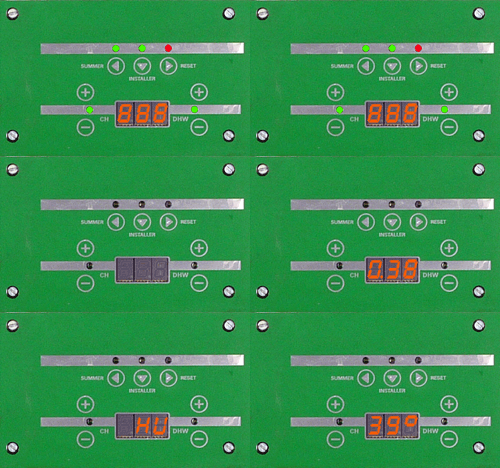
Set Appliance State:
Mains Power Off
Ensure no demand is present
| WARNING! - Mains voltage is expected during test follow TOPs P4 live testing procedure |
Observation:
1. When power is switched on, the boiler will run a self check, the display runs through a sequence of letters and numbers (typical example illustrated above). Allow 45 Seconds for self test to complete before proceeding.
2. During the self check if the boiler detects a situation which it considers to be a fault, the display will flash a fault code starting with an "E" and then a two digit number. If a Fault Code is displayed choose that option below.
3. As there is no demand present, at the end of the sequence the display will show the current primary flow temperature indicating the boiler is in stand-by awaiting a request for heat. The boiler will repeat self test every time power is reinstated.
Note.
Start up sequence for display may vary depending on software version of PCBs fitted.
2. During the self check if the boiler detects a situation which it considers to be a fault, the display will flash a fault code starting with an "E" and then a two digit number. If a Fault Code is displayed choose that option below.
3. As there is no demand present, at the end of the sequence the display will show the current primary flow temperature indicating the boiler is in stand-by awaiting a request for heat. The boiler will repeat self test every time power is reinstated.
Note.
Start up sequence for display may vary depending on software version of PCBs fitted.