Set Appliance State:
| Isolate Mains Power to appliance as per TOPs P4 |
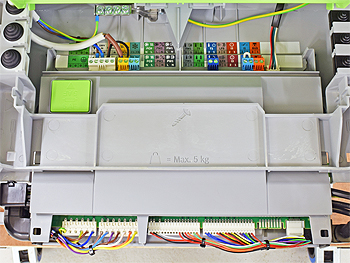
Gain access to PCB (use Insulation Mat as required)
Observation:
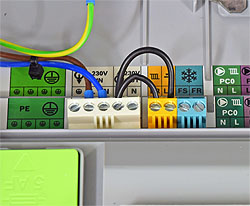
Inspect the terminal strip at the rear of the PCB.
There should be a wire link between the 230V OUT terminal on the white connector and the LR with a tap symbol on the yellow connector.
Is the link present and securely fitted?
Note:
The appearance of the white connector
next to the 240V controls may vary
depending on the PCB version.
There should be a wire link between the 230V OUT terminal on the white connector and the LR with a tap symbol on the yellow connector.
Is the link present and securely fitted?
Note:
The appearance of the white connector
next to the 240V controls may vary
depending on the PCB version.