Set Appliance State:
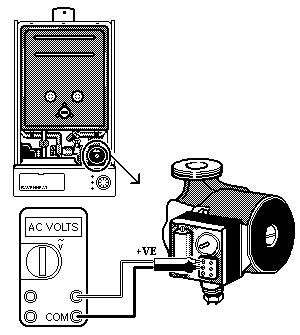
Set Multimeter to AC Volts 
Turn Hot Water Tap On
Isolate Mains Power to appliance as per TOPs P4
Remove terminal cover from pump
Selector switch to hot water position
CH temperature selector to MIN
DHW temperature selector to MAX
Remove terminal cover from pump
Selector switch to hot water position
CH temperature selector to MIN
DHW temperature selector to MAX
| WARNING! Mains voltage is expected during test, follow TOPs P4 live testing procedure |
Measurement:
Check for mains voltage across the live terminal marked L (brown wire) and the neutral terminal marked N (blue wire) on the pump terminal strip.
Isolate as per TOPs P4
and refit as necessary