Set Appliance State:
| WARNING! - Mains voltage is expected during test follow TOPs P4 live testing procedure |
Observation:
When this appliance is fitted with weather compensation a range of additional settings can be adjusted to optimise the appliance and system efficiency, these are the heating curve set points and summer mode.
The heating curve is designed to alter the flow temperature of the appliance based on the outdoor temperature and uses 2 reference point temperatures, one high (+20°C) and one low (-10°C) which are plotted against pre-set flow temperatures, the appliance then automatically works out the best flow temperature.
However it is possible to modify these temperatures from their factory setting, if they are set too low the system will be unable to provide adequate heat to the system.
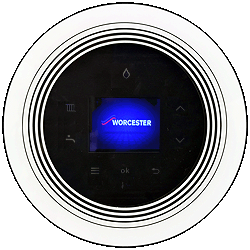
Check the settings by entering the installer/service mode by pressing and holding the tap and radiator symbols simultaneously for 3 seconds then select: "settings" > "heating curve" > "heating curve base" and "heating curve end"
Check the temperatures are suitable for the property type.
Also check the summer mode setting as this being set incorrectly will prevent the boiler from firing:
""settings" > "heating curve" > "summer mode"
Are all the settings correct?
Notes:
1. If wireless controls are fitted it is not possible to modify or check these settings so choose "settings correct".
2. Default heating curve values are available in the manufacturers instructions if they are required.
The heating curve is designed to alter the flow temperature of the appliance based on the outdoor temperature and uses 2 reference point temperatures, one high (+20°C) and one low (-10°C) which are plotted against pre-set flow temperatures, the appliance then automatically works out the best flow temperature.
However it is possible to modify these temperatures from their factory setting, if they are set too low the system will be unable to provide adequate heat to the system.
Check the settings by entering the installer/service mode by pressing and holding the tap and radiator symbols simultaneously for 3 seconds then select: "settings" > "heating curve" > "heating curve base" and "heating curve end"
Check the temperatures are suitable for the property type.
Also check the summer mode setting as this being set incorrectly will prevent the boiler from firing:
""settings" > "heating curve" > "summer mode"
Are all the settings correct?
Notes:
1. If wireless controls are fitted it is not possible to modify or check these settings so choose "settings correct".
2. Default heating curve values are available in the manufacturers instructions if they are required.