Set Appliance State:
| WARNING! - Mains voltage is expected during test follow TOPs P4 live testing procedure |
Measurement:
Preheat is turned on or off by entering boiler installer mode.
To enter hold both buttons together for approximately 5 seconds until the display changes.
Can be difficult to enter, if taking significantly longer than 5 seconds or
if a cross appears above the tap / radiator symbols then let go and reattempt.
Last 3 fault codes will then be displayed in order,
F¹ is the most recent and F³ is the oldest.
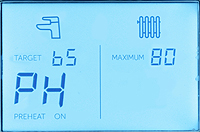
After showing fault codes boiler will be in installer mode. (1)
To change the preheat setting press restart (right hand button).
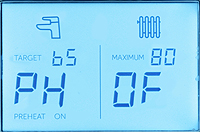
Display will show current preheat setting (either On or OF). (2)
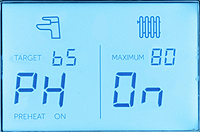
Press mode (left hand button) to change setting. (3)
Once preheat has been adjusted to exit press the reset button (right hand button).
To enter hold both buttons together for approximately 5 seconds until the display changes.
Can be difficult to enter, if taking significantly longer than 5 seconds or
if a cross appears above the tap / radiator symbols then let go and reattempt.
Last 3 fault codes will then be displayed in order,
F¹ is the most recent and F³ is the oldest.
After showing fault codes boiler will be in installer mode. (1)
To change the preheat setting press restart (right hand button).
Display will show current preheat setting (either On or OF). (2)
Press mode (left hand button) to change setting. (3)
Once preheat has been adjusted to exit press the reset button (right hand button).