Set Appliance State:
| WARNING! - Mains voltage is expected during test follow TOPs P4 live testing procedure |
Observation:
When power is switched on the display should operate and
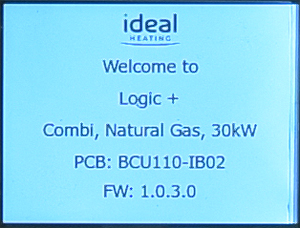
the boiler will run a self-check and display initialisation screen
as shown in the image to the right, with the exact values changing
dependant on boiler type, gas configuration and output, if the
display does not progress from the initialisation CLICK HERE.
If a fault is displayed select that option as
you will not be able to adjust the settings.
Otherwise set boiler as follows:
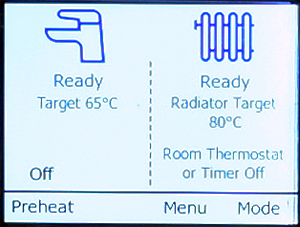
Hot water temperature to maximum (65°C, see note 1) - rotate the left hand control knob to adjust.
Central heating temperature to maximum (80°C, see note 2) - rotate the right hand control knob to adjust.
Hot water & heating turned on - if either the tap or radiator symbols have "off" below them press mode button and select winter mode.
Preheat OFF - Press preheat button to adjust.
Note:
1. Default maximum DHW temperature is 65°C but can be adjusted in boiler menu.
2. Maximum CH temperature 85°C but by default limited to 80°C, set to maximum allowed on boiler menu.
the boiler will run a self-check and display initialisation screen
as shown in the image to the right, with the exact values changing
dependant on boiler type, gas configuration and output, if the
display does not progress from the initialisation CLICK HERE.
If a fault is displayed select that option as
you will not be able to adjust the settings.
Otherwise set boiler as follows:
Note:
1. Default maximum DHW temperature is 65°C but can be adjusted in boiler menu.
2. Maximum CH temperature 85°C but by default limited to 80°C, set to maximum allowed on boiler menu.