Set Appliance State:
| Isolate Mains Power to appliance as per TOPs P4 |
Gain access to PCB (use Insulation Mat as required)
Locate and open the closing plug on the PCB cover & remove plastic
screw driver, if plastic screw driver is missing, use a safe alternative
Ensure No demands
Locate and open the closing plug on the PCB cover & remove plastic
screw driver, if plastic screw driver is missing, use a safe alternative
Ensure No demands
| WARNING! - Mains voltage is expected during test follow TOPs P4 live testing procedure |
Observation:
Cancel purge cycle & If required, reset boiler.
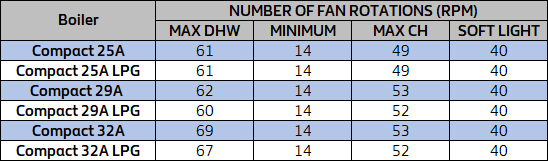
With boiler in the standby mode press the CO button (SW 1) once, the display will then scroll through the fan speeds along with the relevant icon, compare the boiler values displayed against table 1.
1. "Tap" DHW maximum number of fan rotations.
2. "Radiator / Tap" minimum number of fan rotations.
3. "Radiator" CH maximum number of fan rotations.
4. "P" soft light fan speed.
With boiler in the standby mode press the CO button (SW 1) once, the display will then scroll through the fan speeds along with the relevant icon, compare the boiler values displayed against table 1.
1. "Tap" DHW maximum number of fan rotations.
2. "Radiator / Tap" minimum number of fan rotations.
3. "Radiator" CH maximum number of fan rotations.
4. "P" soft light fan speed.

Isolate as per TOPs P4
and refit as necessary