Set Appliance State:
| Isolate Mains Power to appliance as per TOPs P4 |
Observation:
This appliance stores the last 5 faults that it has detected.
To view them:
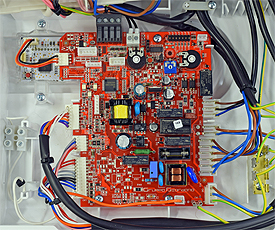
1. Gain access to the PCB, on the back of the PCB housing there should be a plastic screwdriver. If plastic screw driver is missing, use a safe alternative.
2. Restore the electrical supply to the boiler.
Mains Power On
3. Allow 15 seconds to elapse before proceeding.
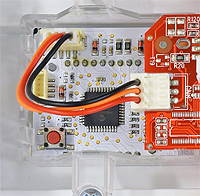
4. Press the small red button on the display PCB once using the plastic screwdriver (see picture), replace screw driver for next time required / person.
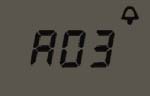
5. Display will now flash the last 5 faults, starting with the most recent.
CLICK HERE TO GO TO FAULT CODE DIAGNOSTICS
To view them:
1. Gain access to the PCB, on the back of the PCB housing there should be a plastic screwdriver. If plastic screw driver is missing, use a safe alternative.
2. Restore the electrical supply to the boiler.
| WARNING! - Mains voltage is expected during test follow TOPs P4 live testing procedure |
3. Allow 15 seconds to elapse before proceeding.
4. Press the small red button on the display PCB once using the plastic screwdriver (see picture), replace screw driver for next time required / person.
5. Display will now flash the last 5 faults, starting with the most recent.
CLICK HERE TO GO TO FAULT CODE DIAGNOSTICS