Set Appliance State:
Mains Power Off
Ensure there is no demand for either CH or DHW
Preheat OFF (if appliance has preheat function)
Selector switch to Hot Water position
Preheat OFF (if appliance has preheat function)
Selector switch to Hot Water position
| WARNING! - Mains voltage is expected during test follow TOPs P4 live testing procedure |
Observation:
When power is switched on the boiler will run a self check which should follow the sequence below:
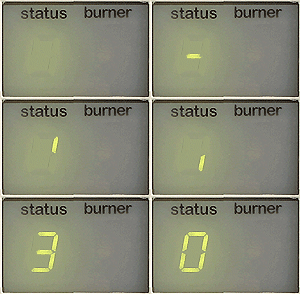
The blue light will illuminate and the display will show 8, the display will then show a rotating dash followed by the model of boiler displayed one digit at a time, either 24c, 30c or 35c (if the display does not progress from the figure 8 CLICK HERE).
At the same time the fan will run and approximately 5sec after the fan starts the pump will run.
If there is no request for any form of heating after 20sec the pump will stop and the fan will continue for a total of 4min, the display will show 0 indicating the boiler is in stand by awaiting a request for heat.
The blue light will illuminate and the display will show 8, the display will then show a rotating dash followed by the model of boiler displayed one digit at a time, either 24c, 30c or 35c (if the display does not progress from the figure 8 CLICK HERE).
At the same time the fan will run and approximately 5sec after the fan starts the pump will run.
If there is no request for any form of heating after 20sec the pump will stop and the fan will continue for a total of 4min, the display will show 0 indicating the boiler is in stand by awaiting a request for heat.