CASE REMOVAL

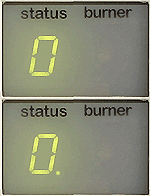


Pre-heat indicator
| Isolate Mains Power to appliance as per TOP's P4 |
Expose 2 screws which are located under the name badge,
undo these screws and lower the facia panel down.
Upper Case Removal
Once the facia panel has been lowered, 2 screws are revealed at the lower left and right-hand corners, undo these screws and pull the case forward at base and then upwards to remove.
Notes.
1. This appliance has a pre-heat mode to reduce the time taken to produce hot water. This diagnostic model requires the appliance to have this function DISABLED (switched off).
This function is enabled or disabled by rotating the DHW temperature control knob fully clockwise to the pre-heat position, hold for 2 seconds
and return to the desired hot water temperature.
Pre-heat enabled, indicator ON.
Pre-heat disabled, indicator OFF.
2. The manufacturer may change the colour of wiring harnesses,
however the connections will remain the same.
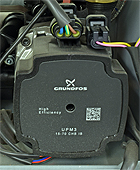
Newer appliances will have an ErP pump fitted, there will also be one fitted if the pump has been replaced since 2022. Where relevant the model will ask you which pump the boiler you are working on has fitted.