Set Appliance State:
Mains Power Off
Selector switch set to OFF
| WARNING! - Mains voltage is expected during test follow TOPs P4 live testing procedure |
Observation:
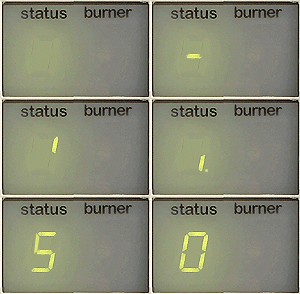
When power is switched on the boiler will run a self-check, the display should follow the sequence as illustrated above.
Allow 1 MINUTE for self-test to complete before proceeding, if a FAULT CODE is displayed choose that option below.
1. During this sequence the display will show 24, 30 or 35 which refers to the appliance model (35 model illustrated).
2. At the same time as the above is taking place the Fan will run and approximately 5 seconds after the fan starts
the pump will begin, after 30 seconds the Pump will stop and the FAN will continue for a total of 4 MINUTES.
3. As the selector switch is set to the OFF position, at the end of the sequence the display will show 0 indicating
the boiler is in stand-by awaiting a request for heat.
Allow 1 MINUTE for self-test to complete before proceeding, if a FAULT CODE is displayed choose that option below.
1. During this sequence the display will show 24, 30 or 35 which refers to the appliance model (35 model illustrated).
2. At the same time as the above is taking place the Fan will run and approximately 5 seconds after the fan starts
the pump will begin, after 30 seconds the Pump will stop and the FAN will continue for a total of 4 MINUTES.
3. As the selector switch is set to the OFF position, at the end of the sequence the display will show 0 indicating
the boiler is in stand-by awaiting a request for heat.