Set Appliance State:
| Isolate Mains Power to appliance as per TOPs P4 |
Set Multimeter to AC Volts 
Turn Hot Water Tap On
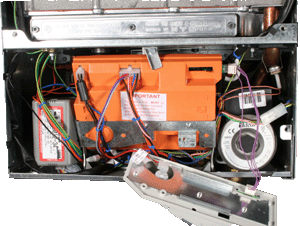
Gain access to bottom of PCB
(This may require unclipping from main bracket)
Remove the fan connector from the PCB
Integral Programmer set to DHW ON and CH ON
Note:
Ensure PCB is located safely before turning the power back ON
(This may require unclipping from main bracket)
Remove the fan connector from the PCB
Integral Programmer set to DHW ON and CH ON
Note:
Ensure PCB is located safely before turning the power back ON
| WARNING! - Mains voltage is expected during test follow TOPs P4 live testing procedure |
Measurement:
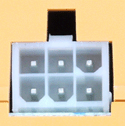
Measure the AC voltage between terminal 6 (the red wire location when plug is fitted) of the PCB fan connector and a suitable earth. The fan connection is at the bottom left hand side of the PCB.
Expect a permanent voltage of approximately 13 vac switching to approximately 130 vac as the PCB attempts to send power to the fan.
Note:
The voltage will rise and fall between 13 vac and 130 vac several times as the PCB attempts to power the fan. It is advisable to monitor the voltage over several attempts before lockout occurs.
Expect a permanent voltage of approximately 13 vac switching to approximately 130 vac as the PCB attempts to send power to the fan.
Note:
The voltage will rise and fall between 13 vac and 130 vac several times as the PCB attempts to power the fan. It is advisable to monitor the voltage over several attempts before lockout occurs.



Isolate as per TOPs P4
and refit as necessary