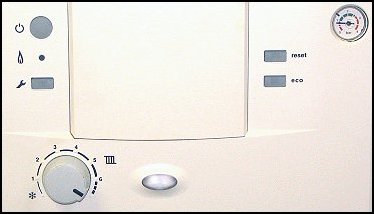
Observation:
This appliance has the facility to turn to BLUE LED off.
To check BLUE LED has not been turned off, follow procedure below.
1. Press the "SPANNER" button for approx 11 seconds (spanner button should illuminate).
2. Press "ECO" button for 10 seconds.
3. Repress "SPANNER" button until spanner button light goes out.
4. BLUE LED now illuminated CLICK HERE
5. BLUE LED still not illuminated follow below.
Tests so far indicate that the BLUE LED on the PCB is faulty this LED is passive and does not affect the operation of the appliance.
Choose option from below.
CONTINUE WITH DIAGNOSIS (RECOMMENDED)
REPLACE PCB FOR FAULTY LED
To check BLUE LED has not been turned off, follow procedure below.
1. Press the "SPANNER" button for approx 11 seconds (spanner button should illuminate).
2. Press "ECO" button for 10 seconds.
3. Repress "SPANNER" button until spanner button light goes out.
4. BLUE LED now illuminated CLICK HERE
5. BLUE LED still not illuminated follow below.
Tests so far indicate that the BLUE LED on the PCB is faulty this LED is passive and does not affect the operation of the appliance.
Choose option from below.
CONTINUE WITH DIAGNOSIS (RECOMMENDED)
REPLACE PCB FOR FAULTY LED