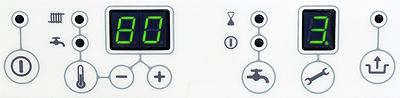
Set Appliance State:
Mains Power Off
No demands
| WARNING! - Mains voltage is expected during test follow TOPs P4 live testing procedure |
Observation:
Access parameter settings as follows:
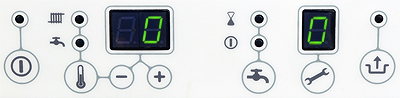
1. Press the 🔧 and buttons simultaneously, 0 should show on main and service display.
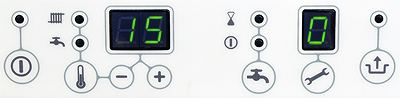
2. Press the + and - buttons to set [15] (service code) on the main display, press 🔧 to enter.
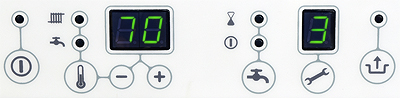
3. Press the 🔧 button until parameter 3 is shown (Maximum CH power).
Default setting is 70%. It can be adjusted lower or higher (up to 85%).
If adjustment is required use the + and - buttons.
4. Press the 🔧 button again to show parameter 3. (Max power modulating pump).
Default setting is 80%. It can be adjusted lower or higher (up to 99%).
If adjustment is required use the + and - buttons.
5. Hold 🔧 button for 5 seconds to save parameters. Press to exit without saving.
1. Press the 🔧 and buttons simultaneously, 0 should show on main and service display.
2. Press the + and - buttons to set [15] (service code) on the main display, press 🔧 to enter.
3. Press the 🔧 button until parameter 3 is shown (Maximum CH power).
Default setting is 70%. It can be adjusted lower or higher (up to 85%).
If adjustment is required use the + and - buttons.
4. Press the 🔧 button again to show parameter 3. (Max power modulating pump).
Default setting is 80%. It can be adjusted lower or higher (up to 99%).
If adjustment is required use the + and - buttons.
5. Hold 🔧 button for 5 seconds to save parameters. Press to exit without saving.