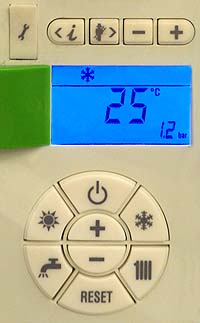
Set Appliance State:
| WARNING! - Mains voltage is expected during test follow TOPs P4 live testing procedure |
Observation:
Increase the system pressure slightly whilst observing the system pressure on the display.
The display should respond to the increase in system pressure.
Does the display respond to the increase in system pressure (see note)?
Note:
If the system pressure is seen to increase, set at between 1.2 - 1.5 bar.
The display should respond to the increase in system pressure.
Does the display respond to the increase in system pressure (see note)?
Note:
If the system pressure is seen to increase, set at between 1.2 - 1.5 bar.