Set Appliance State:
Ensure boiler is cool (below 40°C)
If necessary run the hot water tap with the gas turned off
to cool the appliance (reset ignition lockout as necessary)
If necessary run the hot water tap with the gas turned off
to cool the appliance (reset ignition lockout as necessary)
| WARNING! - Mains voltage is expected during test follow TOPs P4 live testing procedure |
Observation:
Turn hot water tap ON and allow appliance to recognise demand.
Turn hot water tap OFF and allow demand to cease.
Turn ECO mode off (ECO not in the display), press power button briefly to toggle on and off.
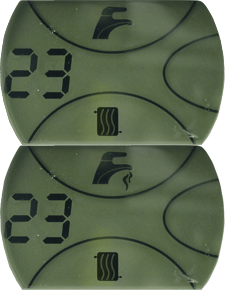
Does the boiler recognise the demand for preheat? (Demand is indicated by lines flashing below the hot water tap symbol in the display and the °C appearing next to the temperature).
Note:
It can take up to 30 seconds for the boiler to react to preheat.
Turn hot water tap OFF and allow demand to cease.
Turn ECO mode off (ECO not in the display), press power button briefly to toggle on and off.
Does the boiler recognise the demand for preheat? (Demand is indicated by lines flashing below the hot water tap symbol in the display and the °C appearing next to the temperature).
Note:
It can take up to 30 seconds for the boiler to react to preheat.