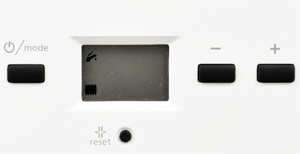
Set Appliance State:
Ensure NO demands are present
| WARNING! - Mains voltage is expected during test follow TOPs P4 live testing procedure |
Measurement:
Set the appliance to DHW and CH mode.
(radiator and tap symbol in display - toggle modes by pressing the "mode" button)
Set both the DHW and CH temperatures to maximum.
(Press the plus button to increase the DHW setting as required then "mode" to toggle to the CH setting)
The display will revert to normal after 3 seconds when the settings have been stored.
Monitor the display for 30 seconds at "standby", the display should be as shown in the "normal display" image.
Does the boiler enter standby as described?
(radiator and tap symbol in display - toggle modes by pressing the "mode" button)
Set both the DHW and CH temperatures to maximum.
(Press the plus button to increase the DHW setting as required then "mode" to toggle to the CH setting)
The display will revert to normal after 3 seconds when the settings have been stored.
Monitor the display for 30 seconds at "standby", the display should be as shown in the "normal display" image.
Does the boiler enter standby as described?