Observation:
Unless stated otherwise in "Set appliance state" the following control settings are required to use this diagnostic model.
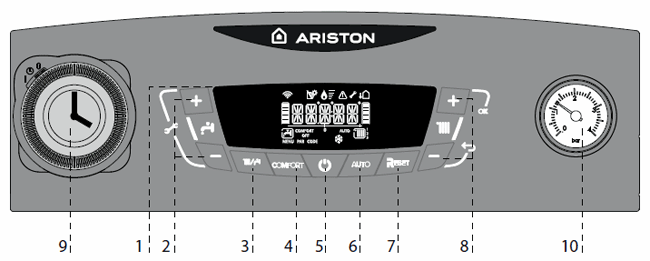
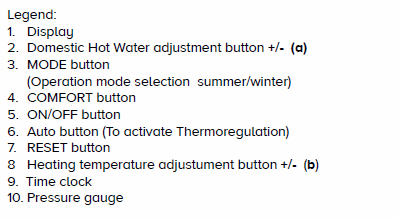
Set the CH temperature to MAX 82°C by pressing the + button (8) on control panel until desired temperature is reached.
Set the DHW temperature to MAX 60°C by pressing the + button (2) on control panel until desired temperature is reached.
Operation mode set to Winter by pressing 'mode' button (3) until both CH and DHW temperatures are displayed.
Comfort turned OFF - Ensure comfort is NOT on the display, press button (4) until comfort is longer on the display.
Auto function (Thermoregulation) OFF - Ensure Auto is NOT on the display, press button (6) until Auto is longer on the display.
Set the CH temperature to MAX 82°C by pressing the + button (8) on control panel until desired temperature is reached.
Set the DHW temperature to MAX 60°C by pressing the + button (2) on control panel until desired temperature is reached.
Operation mode set to Winter by pressing 'mode' button (3) until both CH and DHW temperatures are displayed.
Comfort turned OFF - Ensure comfort is NOT on the display, press button (4) until comfort is longer on the display.
Auto function (Thermoregulation) OFF - Ensure Auto is NOT on the display, press button (6) until Auto is longer on the display.