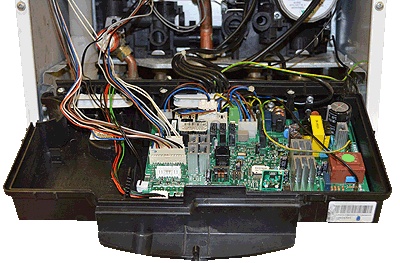
Set Appliance State:
| Isolate Mains Power to appliance as per TOPs P4 |
Set Multimeter to DC Volts 
Turn hot water tap ON with a flow rate of 3 l/min
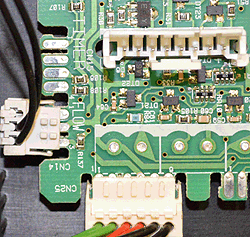
Move connector CN14 until PCB connection strips are exposed but connector is still in contact with the PCB
Move connector CN14 until PCB connection strips are exposed but connector is still in contact with the PCB
| WARNING! - Mains voltage is expected during test follow TOPs P4 live testing procedure |
Measurement:
Measure the DC voltage between pin 2 and pin 3 on the
exposed strips on connector CN14 on the PCB.
Expect between 3.6 and 4.4 VDC.
Notes
1. On some PCB's the connector may not be labelled and its orientation will differ, however the test points and expected results remain the same.
2. The voltage may flicker on the multimeter display which is normal at a low flow rate, increasing the flow rate slightly will help stabilise the reading if desired.
exposed strips on connector CN14 on the PCB.
Expect between 3.6 and 4.4 VDC.
Notes
1. On some PCB's the connector may not be labelled and its orientation will differ, however the test points and expected results remain the same.
2. The voltage may flicker on the multimeter display which is normal at a low flow rate, increasing the flow rate slightly will help stabilise the reading if desired.