UNIVERSAL DISPLAY SET UP
None
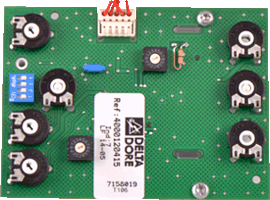



When fitting a universal display PCB; COM1, COM2 and the Fan Speed must be correctly configured for the appliance:
| Boiler Name | COM1 | COM2 | Fan Ignition Speed |
| 12hxi | 4 | 3 | 90 |
| 15hxi | 4 | 3 | 90 |
| 18hxi | 3 | 3 | 90 |
| 24hxi | 4 | 3 | 73 |
| 30hxi | 4 | 3 | 73 |
| 38hxi | 4 | 3 | 73 |
| 18sxi | 7 | 9 | 90 |
| 30sxi | 4 | 3 | 73 |
| 24cxi | F | 3 | 73 |
| 30cxi | D | 3 | 73 |
| 38cxi | D | 3 | 73 |
| BG330 | 6 | B | 73 |
| HR22G | A | 3 | 73 |
| HR30G | 9 | 3 | 73 |
| Halstead Eden VB | 2 | 3 | 76 |
| Halstead Eden SB | 7 | 3 | 76 |
| Halstead Eden CB | E | 3 | 60 |
| Xtramax HE | 0 | 5 | 70 |
If you are fitting the display board to the BG330 or hxi range of boilers the boiler maximum fan speed must also be set up. CLICK HERE
Setting Fan Ignition Speed:
- Turn both CH and (where applicable) DHW temperature controls to '0'
- Switch ON power to the boiler
- Adjust potentiometer B until the fan speed shown on the display matches that shown in the table
Potentiometer B
COM 2
COM 1