Set Appliance State:
Set Multimeter to DC Volts 
Isolate Mains Power to appliance as per TOPs P4
Ensure there is a demand to heat the thermal store - this can be achieved by running the hot water with the power turned off to the appliance
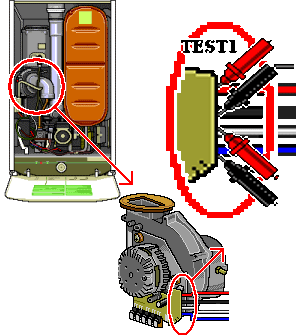
Unclip the top cover of the multi connector on the fan exposing the fan lead connections. The top cover unclips from the side where the leads enter the connector and folds back towards the fan body. (It may be easier to remove the connector, unclip the top cover and refit the connector to carry out the test.)
Ensure there is a demand to heat the thermal store - this can be achieved by running the hot water with the power turned off to the appliance
Unclip the top cover of the multi connector on the fan exposing the fan lead connections. The top cover unclips from the side where the leads enter the connector and folds back towards the fan body. (It may be easier to remove the connector, unclip the top cover and refit the connector to carry out the test.)
| WARNING! - Mains voltage is expected during test follow TOPs P4 live testing procedure |
Measurement:
Reset lockout if necessary.
Test 1: Measure voltage across the red and black leads (terminals 1 and 2). Expected voltage approximately 30 volts DC
Test 2: Measure voltage across the white and blue leads (terminals 3 and 4). Expected Voltage approximately 12 volts DC
Mains power Off.
Replace connector top cover.
Test 1: Measure voltage across the red and black leads (terminals 1 and 2). Expected voltage approximately 30 volts DC
Test 2: Measure voltage across the white and blue leads (terminals 3 and 4). Expected Voltage approximately 12 volts DC
Mains power Off.
Replace connector top cover.

Isolate as per TOPs P4
and refit as necessary