Set Appliance State:
| WARNING! - Mains voltage is expected during test follow TOPs P4 live testing procedure |
Observation:
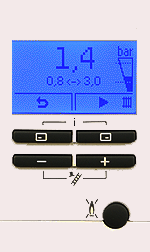
Increase the system pressure slowly while observing the boilers display, increase pressure to approximately 1.0 - 1.4 bar.
Note.
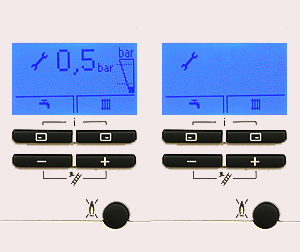
The boiler may enter the air vent function during re-pressurising the system if the pressure was below 0.3 bar and then exceeds 0.5 bar for greater than 15 seconds, this will run automatically for a period of 4 minutes (pump pulses ON/OFF), the boiler will not respond to any demands until the air vent function has completed.
This can only be cancelled by turning the appliance off and then on again with more than 0.5bar system pressure.
If the display returns to the normal standby screen when the pressure exceeds 0.5bar the electronic gauge can be accessed by pressing the central heating button (top right) twice.
Note.
The boiler may enter the air vent function during re-pressurising the system if the pressure was below 0.3 bar and then exceeds 0.5 bar for greater than 15 seconds, this will run automatically for a period of 4 minutes (pump pulses ON/OFF), the boiler will not respond to any demands until the air vent function has completed.
This can only be cancelled by turning the appliance off and then on again with more than 0.5bar system pressure.
If the display returns to the normal standby screen when the pressure exceeds 0.5bar the electronic gauge can be accessed by pressing the central heating button (top right) twice.