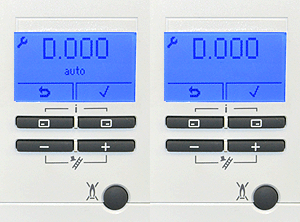
Set Appliance State:
Ensure No demands
| WARNING! Mains voltage is expected during test, follow TOPs P4 live testing procedure |
Observation:
The heat partial load settings is factory set at "AUTO" in the parameter "D.000" and in some cases the appliance modulates down too early to give only a low KW output to the heating system.
Check parameter "D.000", If set to "AUTO" follow step 1, if set to a specific KW value follow step 2.
1. Enter the parameter "D.000" and adjust the default value from "AUTO" to the related output KW figure as required dependant on the system requirements. (example setting 24 = 24KW).
Retest CH operation, apply a CH demand.
2. Enter the parameter "D.000", confirm the value set is suitable for the CH system requirements, adjust the output KW figure if required. (example setting 24 = 24KW)
Retest CH operation, apply a CH demand.
Check parameter "D.000", If set to "AUTO" follow step 1, if set to a specific KW value follow step 2.
1. Enter the parameter "D.000" and adjust the default value from "AUTO" to the related output KW figure as required dependant on the system requirements. (example setting 24 = 24KW).
Retest CH operation, apply a CH demand.
2. Enter the parameter "D.000", confirm the value set is suitable for the CH system requirements, adjust the output KW figure if required. (example setting 24 = 24KW)
Retest CH operation, apply a CH demand.