1. Press the top two buttons simultaneously ( "i").
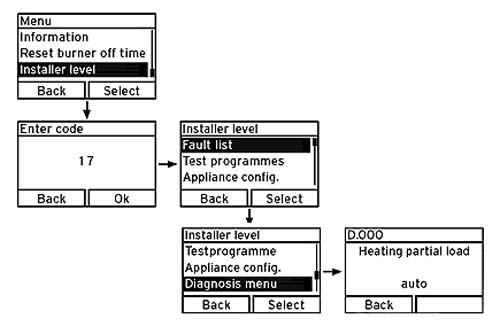
2. Scroll using the minus or plus buttons until "installer level" is highlighted.
3. Press the selection button to select "installer level".
4. Enter the value 17 (code) using the plus or minus button, press the selection button to confirm the entered code, the installer level appears with a selection of menu options.
5. Scroll using the minus or plus buttons until "Diagnosis menu" is highlighted.
6. Press the selection button to select "Diagnosis menu" .
7. Press the selection button to select the parameter D.000.
8. Adjust parameter value using the minus or plus buttons
to the required value.(example setting 24= 24KW)
9. Press the ok button to confirm value, change is saved.
10. Press back button as required to exit and return
to normal display.
2. Scroll using the minus or plus buttons until "installer level" is highlighted.
3. Press the selection button to select "installer level".
4. Enter the value 17 (code) using the plus or minus button, press the selection button to confirm the entered code, the installer level appears with a selection of menu options.
5. Scroll using the minus or plus buttons until "Diagnosis menu" is highlighted.
6. Press the selection button to select "Diagnosis menu" .
7. Press the selection button to select the parameter D.000.
8. Adjust parameter value using the minus or plus buttons
to the required value.(example setting 24= 24KW)
9. Press the ok button to confirm value, change is saved.
10. Press back button as required to exit and return
to normal display.
 dis at standby.gif)