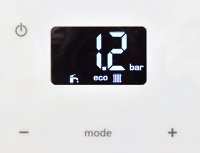
Set Appliance State:
Ensure NO demands
| WARNING! - Mains voltage is expected during test follow TOPs P4 live testing procedure |
Observation:
Reset the appliance (press and hold power button for 4 seconds then release)
The appliance will then start a 1.5 minute self-check program.
While the self-check completes set the appliance to DHW and CH mode (radiator and tap symbol in display - toggle modes by pressing the "mode" button)
Set the appliance to "eco" mode if it is not already in this mode ("eco" displayed - this is switched on and off by pressing and holding the + and - button simultaneously for 4 seconds)
Monitor the appliance for the full 1.5 minutes before selecting an outcome.
If a fault code is shown at the end of the 1.5 minute self-check click here.
The appliance will then start a 1.5 minute self-check program.
While the self-check completes set the appliance to DHW and CH mode (radiator and tap symbol in display - toggle modes by pressing the "mode" button)
Set the appliance to "eco" mode if it is not already in this mode ("eco" displayed - this is switched on and off by pressing and holding the + and - button simultaneously for 4 seconds)
Monitor the appliance for the full 1.5 minutes before selecting an outcome.
If a fault code is shown at the end of the 1.5 minute self-check click here.