Set Appliance State:
| Isolate Mains Power to appliance as per TOPs P4 |
Set Multimeter to AC Volts 
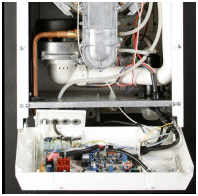
For access behind the control panel
Release the fixing screw located at the top of the case front panel
and lift the panel upwards from its locating pins and then forwards
from the boiler. Remove the two fixing screws that secure the control
panel and lower the panel.
For access to the control panel components
Remove the five screws securing the rear cover and careful raise the
cover from the control panel. When replacing the cover ensure no wires are trapped and all the
wiring is secured. Secure with the screws previously removed do not over tighten.
Release the fixing screw located at the top of the case front panel
and lift the panel upwards from its locating pins and then forwards
from the boiler. Remove the two fixing screws that secure the control
panel and lower the panel.
For access to the control panel components
Remove the five screws securing the rear cover and careful raise the
cover from the control panel. When replacing the cover ensure no wires are trapped and all the
wiring is secured. Secure with the screws previously removed do not over tighten.
| WARNING! - Mains voltage is expected during test follow TOPs P4 live testing procedure |
Measurement:
Reset lockout as necessary.
Boiler switch to On.
With all heating controls calling for heat.
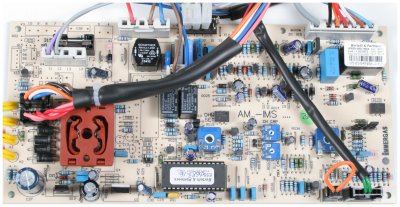
Measure voltage across the connections marked 55 (live brown lead) and connection marked 2 (neutral blue lead) on the connector marked X1.
Boiler switch to On.
With all heating controls calling for heat.
Measure voltage across the connections marked 55 (live brown lead) and connection marked 2 (neutral blue lead) on the connector marked X1.

Isolate as per TOPs P4
and refit as necessary