Set Appliance State:
| Isolate Mains Power to appliance as per TOPs P4 |
Outer Case Removal
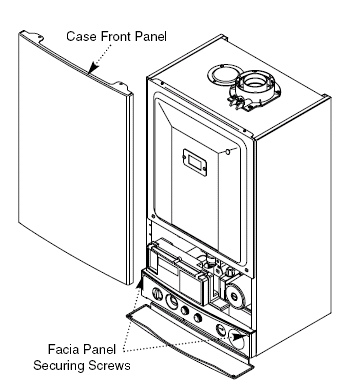
Slacken the screws securing the facia panel.
Lift the outer case panel so that its securing tabs are clear of the facia and remove it.
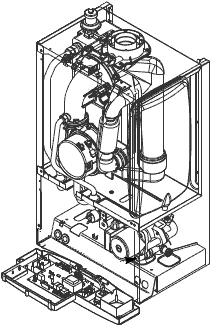
Lower the Facia / Access Lower Section of Appliance
Remove the 2 screws previously slackened for the outer case removal and gently lower the facia.
Combustion Chamber Door Panel Removal
Remove the 2 screws securing the inner door panel.
Lift the panel slightly to disengage it from the studs on top of the case and remove.
Terminal Strip Access
Remove the 1 screw on the front left of the control box and lift the cover.
Control Box Cover Removal
Remove the control box cover securing screws.
Disengage the barbs on the control box from the cover.
Remove the cover.
Inner Door Panel Removal
Remove the screws securing the inner door panel.
Lift the panel slightly to disengage it from the studs on top of the case.
Slacken the screws securing the facia panel.
Lift the outer case panel so that its securing tabs are clear of the facia and remove it.
Lower the Facia / Access Lower Section of Appliance
Remove the 2 screws previously slackened for the outer case removal and gently lower the facia.
Combustion Chamber Door Panel Removal
Remove the 2 screws securing the inner door panel.
Lift the panel slightly to disengage it from the studs on top of the case and remove.
Terminal Strip Access
Remove the 1 screw on the front left of the control box and lift the cover.
Control Box Cover Removal
Remove the control box cover securing screws.
Disengage the barbs on the control box from the cover.
Remove the cover.
Inner Door Panel Removal
Remove the screws securing the inner door panel.
Lift the panel slightly to disengage it from the studs on top of the case.
Isolate as per TOPs P4
and refit as necessary