Set Appliance State:
| Isolate Mains Power to appliance as per TOPs P4 |
Set Multimeter to DC Volts 
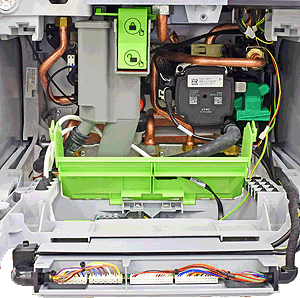
Remove the DC connector from the pump
Ensure NO demand
Ensure NO demand
| WARNING! - Mains voltage is expected during test follow TOPs P4 live testing procedure |
Measurement:
Test 1:
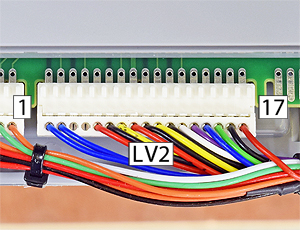
Within the first 15 seconds of turning the power on measure the DC voltage between pin 11 (black) and pin 12 (white) on connector LV2.
Expect a voltage of less than 1.5 VDC.
Test 2:
Measure the DC voltage between the pin 11 (black) and pin 13 (purple).
Expect approximately 6 VDC
Are the voltages measured as expected?
Note:
If you will not be able to carry out test 1 within 15 seconds then enter the service/installer mode by pressing and holding the radiator and tap symbols simultaneously for 3 seconds the select "Function check" > "Activate test" > "Pump" > "On" and then carry out the test - the display can be slow to load for the function checks.
Within the first 15 seconds of turning the power on measure the DC voltage between pin 11 (black) and pin 12 (white) on connector LV2.
Expect a voltage of less than 1.5 VDC.
Test 2:
Measure the DC voltage between the pin 11 (black) and pin 13 (purple).
Expect approximately 6 VDC
Are the voltages measured as expected?
Note:
If you will not be able to carry out test 1 within 15 seconds then enter the service/installer mode by pressing and holding the radiator and tap symbols simultaneously for 3 seconds the select "Function check" > "Activate test" > "Pump" > "On" and then carry out the test - the display can be slow to load for the function checks.



Isolate as per TOPs P4
and refit as necessary