Set Appliance State:
Set Multimeter to DC Volts 
Isolate Mains Power to appliance as per TOPs P4
CH Demand
Remove the fan connector from the PCB
Gain access to PCB (use insulation mat as necessary)
CH Demand
Remove the fan connector from the PCB
Gain access to PCB (use insulation mat as necessary)
| WARNING! - Mains voltage is expected during test follow TOPs P4 live testing procedure |
Measurement:
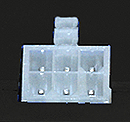
Measure the DC voltage between terminal 4 (the blue wire location when plug is fitted) of the PCB fan connector and a suitable earth. The fan connection is at the back left hand side of the PCB.
Expect a voltage of approximately 75V DC, 5 seconds after power is reinstated, as the PCB attempts to send power to the fan.
Note:
After a 5 second period the voltage will increase to 110V DC, if the boiler has gone to lockout then reset it as necessary until the result of the test can be ascertained.
There are two different versions of the PCB, one version will attempt to send power to the fan multiple times before lockout, the other version will only attempt once before going to 110V DC.
Expect a voltage of approximately 75V DC, 5 seconds after power is reinstated, as the PCB attempts to send power to the fan.
Note:
After a 5 second period the voltage will increase to 110V DC, if the boiler has gone to lockout then reset it as necessary until the result of the test can be ascertained.
There are two different versions of the PCB, one version will attempt to send power to the fan multiple times before lockout, the other version will only attempt once before going to 110V DC.


Isolate as per TOPs P4
and refit as necessary