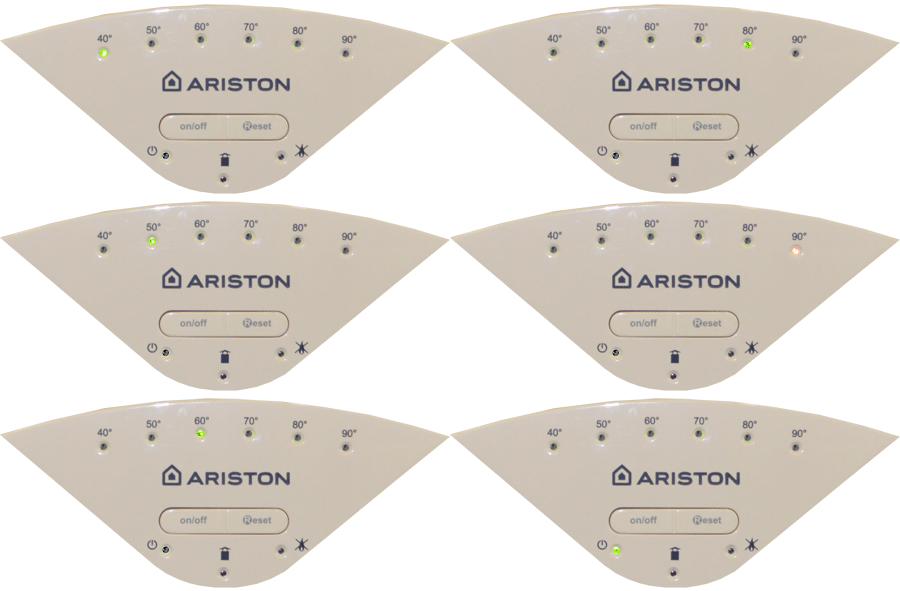
Set Appliance State:
Mains Power Off
NO demands
| WARNING! - Mains voltage is expected during test follow TOPs P4 live testing procedure |
Observation:
Reset the appliance if required (Press reset button once then release)
If the LED's do not illuminate or if the temperature LED's begin to go through there sequence but the power LED does not illuminate after, then press the on / off button once briefly.
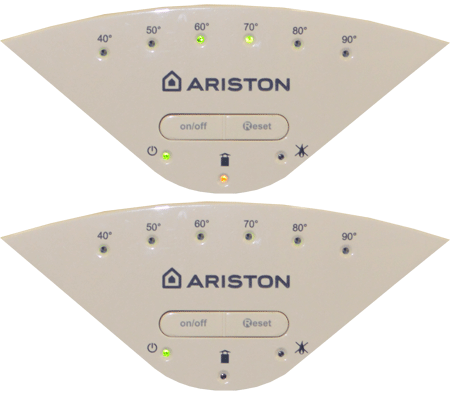
When the power is switched on the appliance should carry out a self-check, during which the temperature LED's will go through a sequence, once this sequence is complete the power LED should be the only LED illuminated, signifying that the appliance has successfully entered standby mode.
Note.
If an Error code is displayed then you MUST choose that option below, some error codes will only appear with a demand.
If the LED's do not illuminate or if the temperature LED's begin to go through there sequence but the power LED does not illuminate after, then press the on / off button once briefly.
When the power is switched on the appliance should carry out a self-check, during which the temperature LED's will go through a sequence, once this sequence is complete the power LED should be the only LED illuminated, signifying that the appliance has successfully entered standby mode.
Note.
If an Error code is displayed then you MUST choose that option below, some error codes will only appear with a demand.