XSol Diagnostic System
Home
← Back
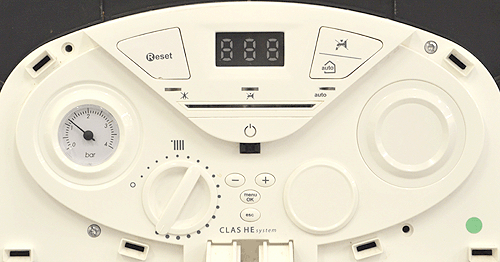
USER DISPLAY GUIDE
Observation:
Unless stated otherwise in "Set appliance state" the
CH temperature needs to be set to MAX 82°C
when following this diagnostic model.
Note:
Wiring harness colours may change but test points will remain the same.
Set CH temperature to MAX 82°C, turn control knob fully clockwise.
Manual RESET button - press once then release.
Menu / OK button, ESC and + /- keys, use for Parameter selection and modification.
Power button - LED illuminates green when ON.
PASS