INITIATING CHECK PROGRAMME P.01 - MAXIMUM LOAD
None
Step 1:
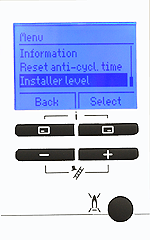
Press the top 2 buttons simultaneously then release to access the menu, scroll down using the + button until Installer level is highlighted. Press 'select' to continue.
Press the top 2 buttons simultaneously then release to access the menu, scroll down using the + button until Installer level is highlighted. Press 'select' to continue.
Step 2:
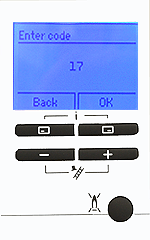
Press the + button until 17 is shown on the display. This is the installer password. Press 'OK' to continue.
Press the + button until 17 is shown on the display. This is the installer password. Press 'OK' to continue.
Step 3:
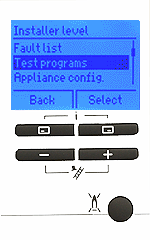
Select Test programs by using the + or - buttons then press 'select' to confirm.
Select Test programs by using the + or - buttons then press 'select' to confirm.
Step 4:
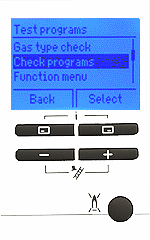
Select Check programs by using the + or - buttons then press 'select' to confirm.
Select Check programs by using the + or - buttons then press 'select' to confirm.
Step 5:
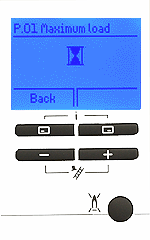
P.01 Maximum load will appear on the screen together with an egg timer for a brief moment.
P.01 Maximum load will appear on the screen together with an egg timer for a brief moment.
Step 6:
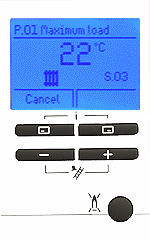
Maximum load check programme P.01 is then initiated, after successful ignition the appliance will operate at maximum heat input. To end check programme and return to standby press the cancel/ back button (top left) five times.
Maximum load check programme P.01 is then initiated, after successful ignition the appliance will operate at maximum heat input. To end check programme and return to standby press the cancel/ back button (top left) five times.
Note:
If the display is not illuminated, press any button to wake the display, once it is illuminated you can then follow the above process to initiate check programme P.01. Refer to Adapt for further guidance.
If the display is not illuminated, press any button to wake the display, once it is illuminated you can then follow the above process to initiate check programme P.01. Refer to Adapt for further guidance.