CALLING UP THE INSTALLER LEVEL AND DIAGNOSTIC CODE GUIDANCE
None


Step 1:
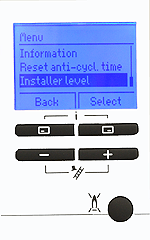
Press the top 2 buttons simultaneously to access the menu, scroll down using the + button until Installer level is highlighted. Press 'select' to continue.
Press the top 2 buttons simultaneously to access the menu, scroll down using the + button until Installer level is highlighted. Press 'select' to continue.
Step 4:
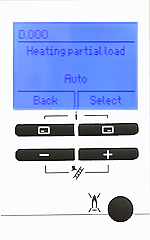
D.000 will be displayed, this is the first Diagnostic code. Using the +/- buttons select the desired diagnostic code, then press 'select'
D.000 will be displayed, this is the first Diagnostic code. Using the +/- buttons select the desired diagnostic code, then press 'select'
Step 2:
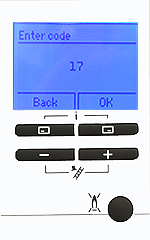
Press the + button until 17 is shown on the display. This is the installer password. Press 'OK' to continue.
Press the + button until 17 is shown on the display. This is the installer password. Press 'OK' to continue.
Step 3:
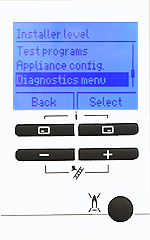
Scroll down using the + key until Diagnostics menu is highlighted. Press 'Select' to continue.
Scroll down using the + key until Diagnostics menu is highlighted. Press 'Select' to continue.
Step 6:
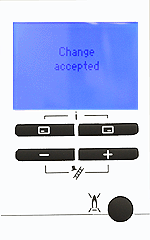
Change accepted will appear briefly on the display before reverting back to the selected diagnostic code. To exit the diagnostic codes press the 'Back' button 3 times.
Change accepted will appear briefly on the display before reverting back to the selected diagnostic code. To exit the diagnostic codes press the 'Back' button 3 times.
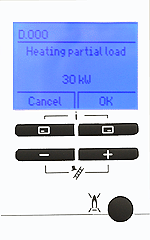
Highlighted above is the current stored value of the diagnostic code.
Step 5:
Press the +/- buttons to change the value to the desired setting. Press the 'OK' button and the changes made will be accepted.
Press the +/- buttons to change the value to the desired setting. Press the 'OK' button and the changes made will be accepted.
Note:
If the display is not illuminated, press any button to wake the display, once it is illuminated you can then follow the above process to call up the installer level. Refer to Adapt for further guidance on diagnostic codes.
If the display is not illuminated, press any button to wake the display, once it is illuminated you can then follow the above process to call up the installer level. Refer to Adapt for further guidance on diagnostic codes.