Set Appliance State:
Ensure NO demands
| WARNING! - Mains voltage is expected during test follow TOPs P4 live testing procedure |
Observation:
For information on how to access d.93 refer to "Other" in ADAPT.
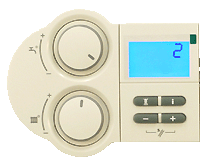
Once you navigate to d.93, the Device Specific Number (DSN)
will be displayed when you press the "i" button.
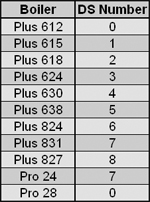
Confirm the boilers DSN number is set correctly (refer to the table), if the DSN number is set for the wrong appliance this will reduce the heat input or cause F70 fault to display.
Is the Device Specific Number (DSN) set up correctly ?
Once you navigate to d.93, the Device Specific Number (DSN)
will be displayed when you press the "i" button.
Confirm the boilers DSN number is set correctly (refer to the table), if the DSN number is set for the wrong appliance this will reduce the heat input or cause F70 fault to display.
Is the Device Specific Number (DSN) set up correctly ?