Set Appliance State:
| WARNING! - Mains voltage is expected during test follow TOPs P4 live testing procedure |
Observation:
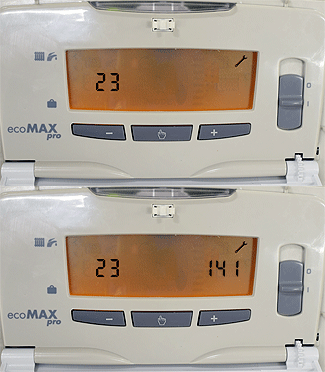
To check the display board settings you need to enter the status mode codes.
Press and hold the 'mode' button (👆) for 10 seconds until a flashing '0' appears.
Press the '+' button and scroll through until '35' (engineer mode)
is shown on the screen, then press the 'mode' button again.
Use the + and - to scroll through to parameter 9.
This parameter should be set to 0.
If the parameter requires adjustment press the 'mode' button, the right
hand number should now be flashing then use the + and -
to adjust the value to 0 then press the 'mode' button again to confirm.
Press and hold the 'mode' button for 10 seconds to return to the normal mode.
Note:
For more information refer to manufacturer instructions in ADAPT.
Press and hold the 'mode' button (👆) for 10 seconds until a flashing '0' appears.
Press the '+' button and scroll through until '35' (engineer mode)
is shown on the screen, then press the 'mode' button again.
Use the + and - to scroll through to parameter 9.
This parameter should be set to 0.
If the parameter requires adjustment press the 'mode' button, the right
hand number should now be flashing then use the + and -
to adjust the value to 0 then press the 'mode' button again to confirm.
Press and hold the 'mode' button for 10 seconds to return to the normal mode.
Note:
For more information refer to manufacturer instructions in ADAPT.